Connect a recording server (SIPREC)
Live Hub can stream calls to a third-party recording or voice biometrics server, such as NICE, Verint, or Lumenvox, using the SIPREC session recording protocol. Live Hub acts as the Session Recording Client (SRC). Your server is the Session Recording Server (SRS), and you define it in Live Hub as a SIP connection.
To create the SIPREC connection:
-
In the Navigation pane, expand Voice channels, and select SIP connections.
-
Click Add new SIP connection.
-
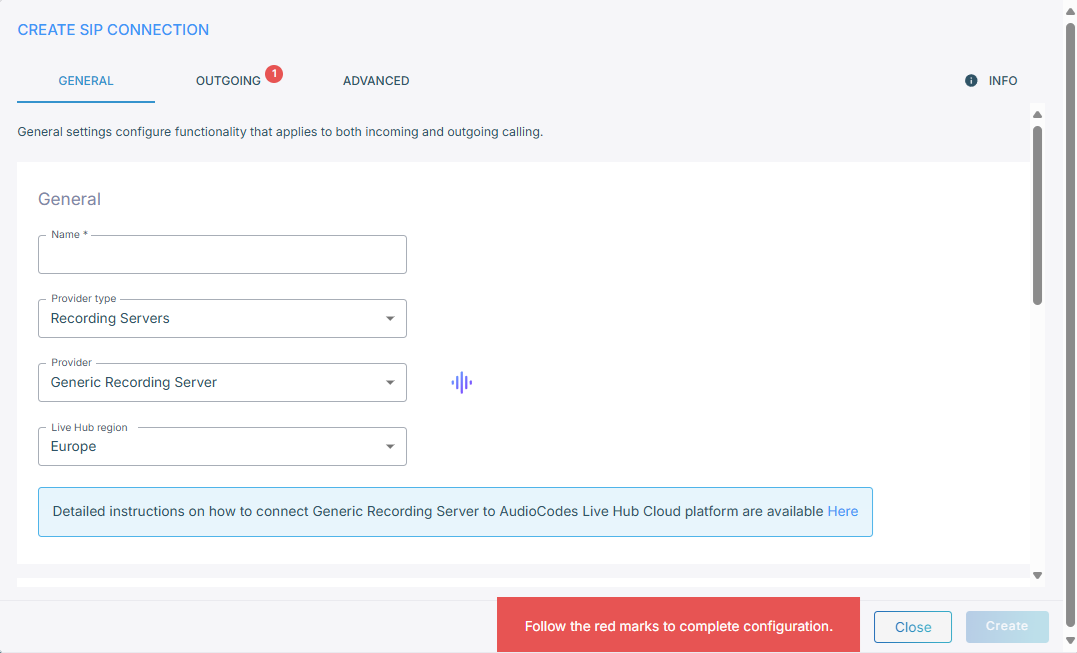
On the General tab, under General:
- In the 'Name' field, enter a name for the connection.
- From the 'Provider type' drop-down list, select Recording Servers.
- From the 'Provider' drop-down list, select Generic Recording Server.
- From the 'Live Hub region' drop-down list, select the region your Live Hub voice infrastructure runs in. See Global region support.
A failure status appears until every required field across all the tabs is filled in. It clears once they are.
-
Fill in the Outgoing and Advanced tabs as you would for any generic connection. See Outgoing and Advanced.
A recording server only ever receives calls, so this connection type has no Incoming or Numbers tab.
-
Click Create.
Route calls to the recording server
The recording server receives nothing until a routing rule sends calls to it.
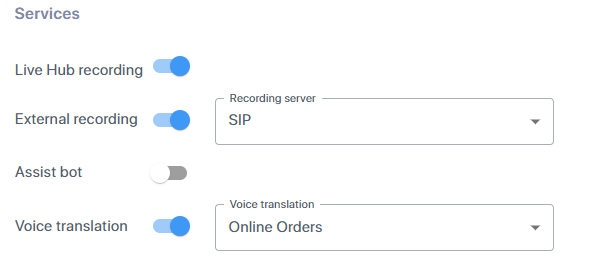
On each routing rule whose calls you want recorded, under Services, select External recording, and then select your SIPREC server from the 'Recording server' drop-down list.